
My homelab has a number of different servers, and they all require SSH keys to log into them. When a key gets rotated the public side of the key needs to be added to all the different servers and virtual machines. This can be a pretty time consuming process, so let’s automate it a little bit!
First to set the groundwork for this post, I’ve already generated the key and stored the private side in my password management setup. The goal here is that we update the authorized_keys file for every device on my network, without having to manually connect and copy/paste the public key value.
Ansible
Ansible is a wonderful tool that can make it very easy to run repeatable tasks on multiple servers, including for updating SSH keys. You utilize an inventory file that defines the different hostnames the Ansible agent will connect to, for example:
[servers]
  server1.myhostname.com
  server2.myhostname.com

[servers2]
  server1.myhostname.com
  server3.myhostname.com
Code language: CSS (css)
This is especially nice because it allows you to specify different groups, giving a slightly more fine-grained control over which hosts are acted upon using a playbook. What’s a playbook? It’s the definition file that explains the steps Ansible should take. For example, the playbook for updating SSH public keys I wrote looks like:
- name: Update SSH public keys
  hosts: all
  vars:
    ssh_user: me
    keys_file: "{{ playbook_dir }}/authorized_keys"

  tasks:
  - name: Get the latest ssh authorized_keys values
    ansible.posix.authorized_key:
      user: "{{ ssh_user }}"
      state: present
      key: "{{ lookup('file', keys_file) }}"
      exclusive: true
      manage_dir: trueCode language: PHP (php)
The ansible.posix.authorized_key is the important bit here, this is the Ansible module that will be run against the given host(s) to update the user’s authorized keys file. It adds new key values, and removes ones that are no longer present in the source authorized_keys file.
Git(ea)
Part of my homelab services includes an instance of Gitea, a self hosted Git management site similar to how Github or Gitlab operates.
One of the repositories included in my Gitea instance contains these Ansible playbooks and inventory file, meaning I can version control the playbooks themselves and centrally manage the inventory file (rather than having to update it across separate devices as the playbooks/inventories change).
Now, a second repository contains the SSH public key(s) stored in an authorized_keys file, formatted the same as the authorized_keys file you’d find in your ~/.ssh/authorized_keys directory, which keeps things very simple and easy to read. This repo also contains a Jenkinsfile to instruct Jenkins how to marshal everything together.
Submodule
To keep things a little more portable, the ssh-config repo is split off from my primary Ansible repo. The main ansible repo in Gitea is responsible for tracking the centralized Inventory list of all the different servers, as well as the Ansible config file and other supporting items.
To make this inventory available to the ssh-config repo (and it’s related Jenkins job) it’s pulled in via a Git submodule. This effectively makes the ansible repo show up as a sub-directory inside ssh-config, allowing Jenkins to clone down ssh-config but also receive the ansible inventory and config as a subdirectory inside it!
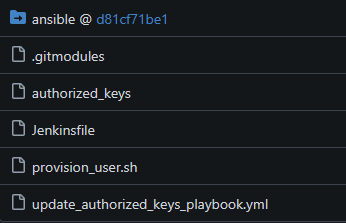
ansible directory, this is a link back to the ansible Git repository. This “link” is controlled by the .gitmodules file.Jenkins
Jenkins is a CI/CD tool that can run jobs automatically, and triggered by commits in a Git repository. What’s nice about this is that we can point Jenkins to the local Gitea instance and specifically my ssh-config repository. When a commit is made to this repo’s primary branch, it will automatically trigger the Jenkins pipeline to run the commands specified in the Jenkinsfile located in the repo, itself being version controlled (and therefore easy to update and maintain).
I won’t go into exact specifics for how to configure Jenkins, this isn’t meant to be a tutorial, but in short you’re setting up Jenkins to listen for commits on a specific git repo.
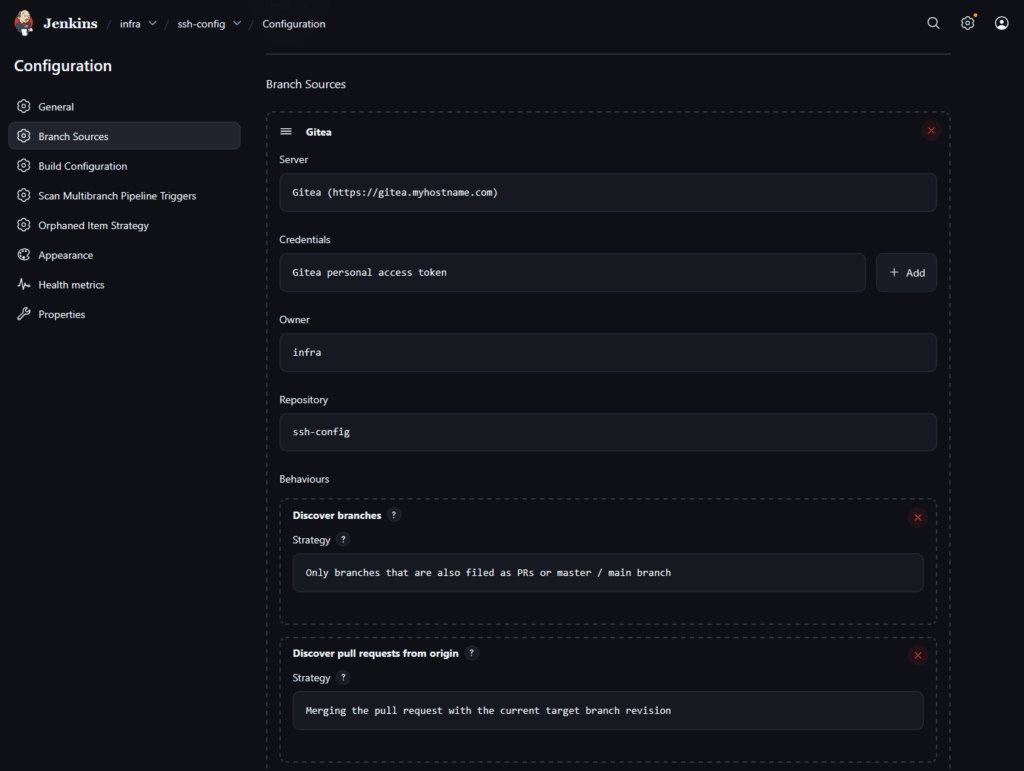
Jenkins Agent
Jenkins itself is just an orchestrator, it doesn’t actually execute any commands by itself. Instead it hands off jobs to different “agents”. The nice thing here is that you can have multiple agents to offload tasks to, which can be especially useful if your needs scale up and a single agent doesn’t have enough throughput for you. However, in my personal homelab that would be super overkill, so a single agent is all that’s needed.
The agent, being the actual service executing the Ansible playbook, needs to have Ansible installed on it (which it’s not by default). So I have a custom Dockerfile that builds out the agent and installs Ansible on build, here’s what that Dockerfile looks like:
# Start from the official Jenkins SSH agent image
FROM docker.io/jenkins/ssh-agent:jdk21

# Switch to root to install packages
USER root

# Install Ansible (and recommended bits)
RUN apt-get update \
    && apt-get install -y --no-install-recommends \
        ansible \
        python3 \
        python3-pip \
        sshpass \
    && rm -rf /var/lib/apt/lists/*

# Drop back to the jenkins user so the agent runs as normal
USER jenkinsCode language: PHP (php)
When the Jenkins-Agent container is building, it will install Ansible via apt.
Putting It All Together
So we have a lot of different components all talking to each other, how does the flow actually work?
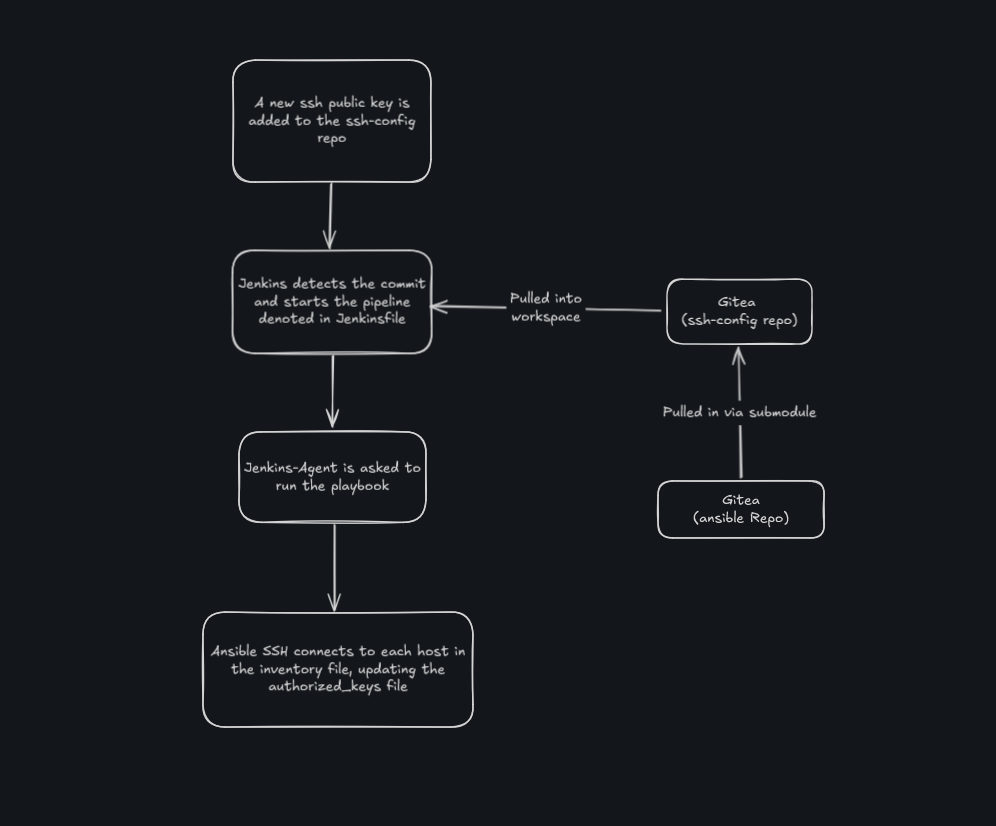
- A new SSH key pair is generated using
ssh-keygen - The public side of the key is added to the
authorized_keysfile stored in thessh-configrepo on Gitea - Jenkins detects this commit, and begins running the pipeline as defined by
Jenkinsfilealso inssh-config - The
ssh-configrepo is cloned down to the Jenkins workspace- This also pulls in the
ansiblerepo, containing the inventory file and Ansible configurations, as a submodule
- This also pulls in the
- Jenkins-Agent runs the
ansible-playbookcommand pointing to theupdate_authorized_keys_playbook.ymlfile fromssh-config- This connects to each host in the inventory file, updating the connected user’s
~/.ssh/authorized_keysfile
- This connects to each host in the inventory file, updating the connected user’s
The Jenkins console output reports the success of each host connection and update:
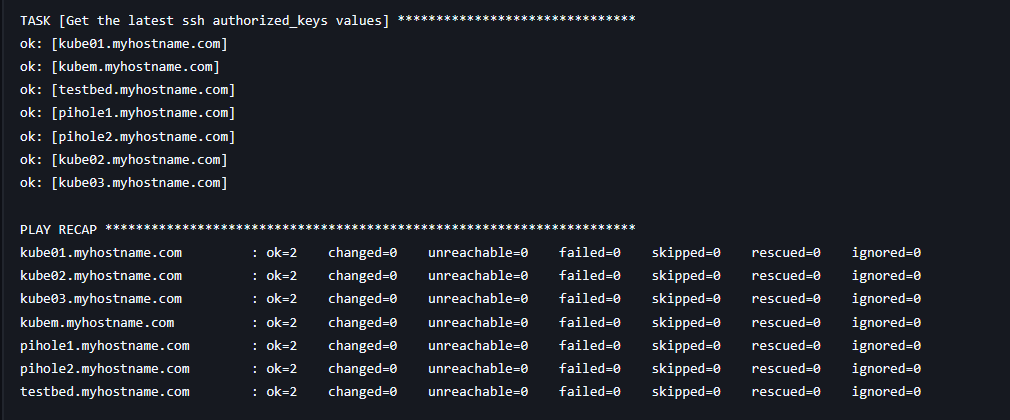
A Note on Security
One thing that should be mentioned is that of security and risk mitigation. SSH keys themselves are very secure to maintain access to servers and devices, and this underlying process relies on SSH access being available in the first place to run.
But it’s also important to call out that this process is blindly pushing up (public) keys stored in a file on a Git repository. For my personal use this is acceptable, Gitea is hosted on an internal server only I have access to. However, if someone were to, somehow, gain access to the ssh-config git repo and push in a public key corresponding to an SSH key they owned, they would suddenly have access to all servers on my home network!
Again, this is not a risk level I consider dangerous for my personal devices on my home network; however, this is not necessarily the same level of acceptable risk I would consider passable for a production, public or shared environment. I would not, for example, hook this system up to a publicly available Git repo (even if merge permissions were set accordingly). While storing public keys somewhere that’s, well, public isn’t necessarily a direct risk, the increased visibility of public keys, the chance of someone maliciously adding their own public key, or somehow accessing the Ansible configuration is a risk I wouldn’t add to a production/public environment, and you shouldn’t either!
Done!
And with this we are complete! A pipeline to update ssh public keys across all devices. While there’s a lot of wiring and individual steps, the actual core functionality here is not super complicated. This was a fun project that gave me a much better understanding of Jenkins and how it operates, as well as making it a lot easier to rotate and manage SSH keys across multiple devices.