
So now I have a new machine running a fancy new GPU with a whopping 32gb of VRAM available and a fresh install of Ubuntu 26.04! Now the only real limitation that I have is the Intel driver ecosystem. At this immediate moment it’s pretty stable, but far from streamlined.
Most of the steps I followed were from this guide (https://github.com/ggml-org/llama.cpp/blob/master/docs/backend/SYCL.md#linux) and I highly recommend it. The only major deviation I made was not needing to install drivers.
Drivers
The good news is that Ubuntu 26.04 (I believe back to 25.04) supports Intel GPUs out of the box, so the driver layer is already solved. Now we have to get the LLM runner to utilize the GPU; some sort of back end is also required to connect the hardware to the inference engine.
After install the clinfo package, I could see the GPU was visible to the OS:
$ clinfo -l
Platform #0: Intel(R) OpenCL
 `-- Device #0: 12th Gen Intel(R) Core(TM) i5-12400
Platform #1: Intel(R) OpenCL Graphics
 `-- Device #0: Intel(R) Arc(TM) Pro B70 GraphicsCode language: PHP (php)
Drivers done!
Vulkan or SYCL
llama.cpp can be set up using either Vulkan or SYCL as backends to communicate with the GPU. I chose to go with the SYCL backend because it’s reportedly more stable. I also believe it will receive significant refinements as it’s the backend Intel is contributing to.
The guide from the llama.cpp maintainers on utilizing the SYCL backend was invaluable. llama.cpp needs to be compiled from source, and the guide provided exact apt packages to install. At least in my case on a fresh Ubuntu 26.04 install, the process was pretty painless. Mostly just requiring executing a shell command:
./examples/sycl/build.shAnd once it completes we have a built llama.cpp server!
Model
I’ve been using this Qwen 3.6 model a good bit: https://huggingface.co/Qwen/Qwen3.6-35B-A3B
It’s a larger model, but it’s overall performance and accuracy has been great so far! That said, it was just too large for the older 3060’s VRAM allotment and the slowness of the older Optiplex tower. While I didn’t do a great job capturing performance metrics, this little slice of tokens per second speaks volumes:

Only 3.6 tokens per second?! Come on I can think for myself faster than that!
Loading up the same model with llama.cpp immediately showed a massive performance increase!
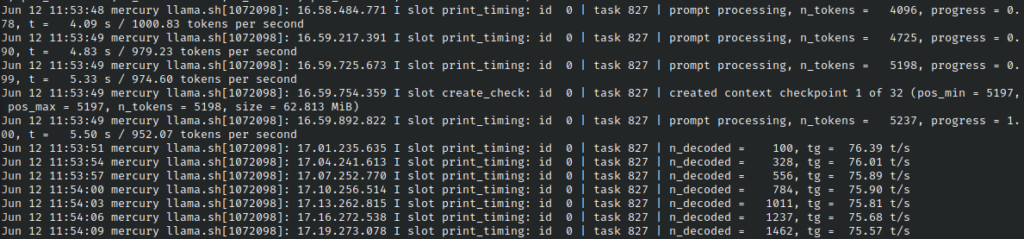
With no other performance tuning or tweaking, I’m seeing roughly 900-1000 tokens per second in terms of prompt parsing/evaluation, and a response generation time of ~75 tokens/second.
I’m still seeing the “thinking” time take a little longer than I’d like, but it’s so much more usable! And future tweaking and refinements should make it even more performant.
Running
Previously I’ve made use of different model runners to play with, starting with Ollama and then LM Studio. Both applications were great for their respective needs, but I was limited when switching to this Intel GPU for what model runners supported the SYCL backend.
That left pretty much just llama.cpp. I haven’t used llama.cpp in the past, and it seems a little less like a general “model runner” and more tuned for running a singular model in long lived processes. This is fine for my needs, but it does make management of the runner itself a little more difficult.
For example, if I wanted to run a model with a couple of the tuning parameters tweaked, I had to use this command:
/home/jason/llama.cpp/build/bin/llama-server \
  -m /home/jason/models/Qwen3.6-35B-A3B.gguf \
  --host 0.0.0.0 \
  --port 8080 \
  -ngl 999 \
  --ctx-size 32768 \
  --temp 1.0 \
  --top-p 0.95 \
  --top-k 20 \
  --min-p 0.0 \
  --presence-penalty  1.5 \
  --parallel  1
Code language: Shell Session (shell)
Now just shoving this into a shell script by itself is pretty simple, but we can do better than that! Thanks to ChatGPT’s help we came up with this little script:
#!/bin/bash
set -eo pipefail
source /opt/intel/oneapi/setvars.sh –force
SCRIPT_DIR=”$(cd “$(dirname “${BASH_SOURCE[0]}”)” && pwd)”
MODELS_JSON=”$SCRIPT_DIR/models.json”
MODEL_DIR=”/home/jason/models”
LLAMA_CPP_DIR=”/home/jason/llama.cpp”
LLAMA_SERVER=”$LLAMA_CPP_DIR/build/bin/llama-server”
export ONEAPI_DEVICE_SELECTOR=level_zero:0
if [[ ! -f “$MODELS_JSON” ]]; then
echo “ERROR: models.json not found at: $MODELS_JSON” >&2
exit 1
fi
MODEL_ALIAS=”${1:-}”
if [[ -z “$MODEL_ALIAS” ]]; then
MODEL_ALIAS=”$(jq -r ‘keys_unsorted[0]’ “$MODELS_JSON”)”
fi
if ! jq -e –arg alias “$MODEL_ALIAS” ‘.[$alias]’ “$MODELS_JSON” >/dev/null; then
echo “ERROR: model alias not found in models.json: $MODEL_ALIAS” >&2
echo “Available models:” >&2
jq -r ‘keys_unsorted[]’ “$MODELS_JSON” >&2
exit 1
fi
MODEL_FILE=”$(jq -r –arg alias “$MODEL_ALIAS” ‘.[$alias].model // empty’ “$MODELS_JSON”)”
if [[ -z “$MODEL_FILE” ]]; then
echo “ERROR: model ‘$MODEL_ALIAS’ does not define a model file” >&2
exit 1
fi
if [[ “$MODEL_FILE” = /* ]]; then
MODEL_PATH=”$MODEL_FILE”
else
MODEL_PATH=”$MODEL_DIR/$MODEL_FILE”
fi
if [[ ! -f “$MODEL_PATH” ]]; then
echo “ERROR: model file not found: $MODEL_PATH” >&2
exit 1
fi
cd “$LLAMA_CPP_DIR”
cmd=(
“$LLAMA_SERVER”
-m “$MODEL_PATH”
–host “0.0.0.0”
–port “8080”
-ngl “999”
)
add_json_arg() {
local json_key=”$1″
local cli_flag=”$2″
local value
value=”$(jq -r –arg alias “$MODEL_ALIAS” –arg key “$json_key” ‘.[$alias][$key] // empty’ “$MODELS_JSON”)”
if [[ -n “$value” ]]; then
cmd+=(“$cli_flag” “$value”)
fi
}
add_json_arg “ctx-size” “–ctx-size”
add_json_arg “temp” “–temp”
add_json_arg “top-p” “–top-p”
add_json_arg “top-k” “–top-k”
add_json_arg “min-p” “–min-p”
add_json_arg “presence-penalty” “–presence-penalty”
add_json_arg “parallel” “–parallel”
echo “Selected model alias: $MODEL_ALIAS”
echo “Running command:”
printf ‘ %q’ “${cmd[@]}”
echo
exec “${cmd[@]}”
Okay so what’s happening here? Well first of all we’re looking for a models.json file, let’s look at that first:
{
  "qwen": {
    "model": "Qwen3.6-35B-A3B.gguf",
    "ctx-size": 32768,
    "top-k": 20,
    "top-p": 0.95,
    "min-p": 0.0,
    "temp": 1.0,
    "presence-penalty": 1.5,
    "parallel": 1
  },
  "gemma": {
    "model": "gemma-4-31B.gguf",
    "ctx-size": 32768
  }
}
Code language: JSON / JSON with Comments (json)
Here we define our different models as part of a large JSON object. Each node in the object represents a different model, keyed by an alias of some kind. The node contains customization parameters that can be handed down to llama.cpp, so we can tweak settings of different models to experiment with them.
Utilizing this new script is really simple: ./llama.sh qwen will load the qwen block out of the JSON object. If we don’t pass an argument at all, it just starts the very first model definition it can find. The customization parameters are added as flags to the actual llama-server execution.
Systemd
Finally we can set up llama.cpp to be a systemd service with a simple systemd definition located in /etc/systemd/system/llama-server.service:
[Unit]
Description=llama.cpp server
After=network-online.target
Wants=network-online.target

[Service]
Type=simple
User=jason
Group=jason
ExecStart=/home/jason/llama.sh
Restart=on-failure
RestartSec=5
WorkingDirectory=/home/jason
Environment=HOME=/home/jason

[Install]
WantedBy=multi-user.target
Code language: Shell Session (shell)
Now it’s easy to run and manage llama.cpp! For example if we want to test and switch models we would just:
- Download our new model from HuggingFace to our
~/modelsdirectory - Update
models.jsonwith the new path to the model (and any additional customization params we might want) sudo systemctl stop llama-serverto stop the current running process- Use
./llama.sh <model alias>to start llama.cpp manually with our new model- This will allow us to test out model performance and make some tweaks
Now if we want to switch models being used long term we can either adjust the order of entries in the models.json file (the script we wrote earlier will just load the first model in the json file if one is not explicitly requested) or update the llama-server.service file to add the alias to the ExecStart command.
Conclusion
I now have a new “AI Box” to experiment and spend some time learning. While I was making progress utilizing the old 3060 and very old Optiplex server, the time to process and limitations on model size were pretty painful right from the start.